- Shopping, made easy.
- /
- Get the app!
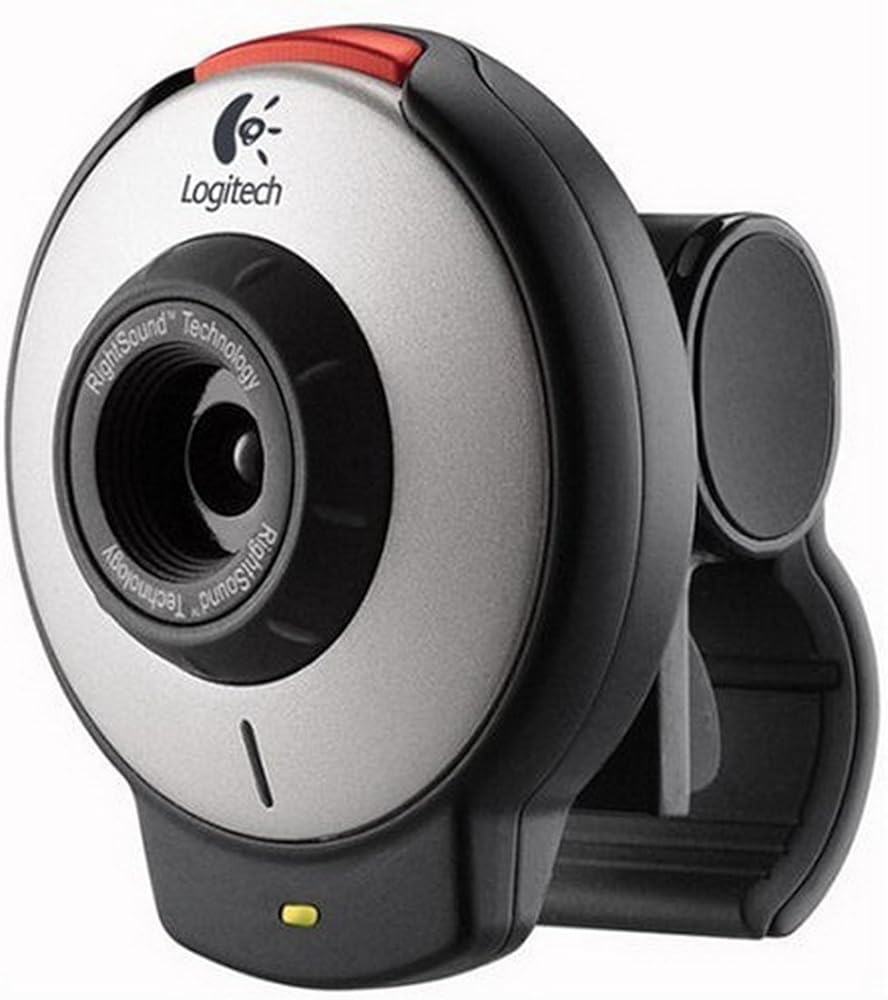
From the ManufacturerQuickCam for Notebooks makes clear, crisp video calling exactly what it should be - simple. Designed for the modern road warrior, this travel-size webcam works seamlessly with free Logitech Vid software for dramatically simplified video calls back home. Enjoy one-click-to-call convenience, vivid VGA resolution, and clear conversations with the built-in, high quality microphone. For its small price, this webcam delivers big benefits for families who want to stay in touch, "in person".
Be home from miles away with picture-perfect, portable video calling.
No doubt about it. Your notebook is your mobile office. And now, it's also your instant video-call connection to your family whenever work takes you away from home. With the affordable QuickCam for Notebooks and free Logitech Vid software, you can see, hear and be with your family in just one click. And you'll be there in real-life clarity and detail, thanks to Logitech high quality video and audio. Laugh. Wave hi. Blow a kiss goodnight. It's as close as you can get to being there in person. And it's never been this easy.
Be home in one click with easy video calling for the modern road warrior.
It's about time video calling became easy for anyone to use. With new Logitech Vid software and QuickCam for Notebooks, you get a sharp and clear, yet dramatically simplified, video calling experience. It's the "one-click-to-call" software solution that works seamlessly with any new or existing Logitech webcam. And it's free for you and anyone you call.
Easy set up
Logitech video calling software lets you
install and call in half the time. Just download the free software and you'll be ready to call in half the time it takes using other video call services. With the simple, intuitive interface, you can set up Vid—and your Logitech webcam—in just a few clicks. Click. Chat. Simple as that.
Fast connections
One-click calling without extra steps
and hassles.Finally, video calling a friend is as easy as clicking on their picture and email address. No screen names or accounts to remember. With Vid "one-click-to-call", there are no extra steps to keep you from connecting with the people you care about most. All of your contacts are within easy reach. So you're ready to call the moment your webcam is.
Free for all
Invite and add friends using their email address.
It's free and that simple. Vid software is free with your new or existing Logitech webcam. It's also free for anyone you invite to connect with you. Want to add a friend to your call list? Simply choose "Add a friend" to send them an email invitation and software link. Once they sign up, you're both set for free one-click calling—no strings attached.
Crystal-clear video chats
Crisp, clear, full-screen viewing powered by the Logitech SightSpeed network.All of this simplicity is powered by the Logitech SightSpeed network, a groundbreaking framework designed specifically for video calling. It's also how Logitech Vid can deliver crisp, clear video and audio without complications. See it for yourself with Logitech Vid and QuickCam for Notebooks.
Key FeaturesTrue VGA resolution for vivid video calls and photos
Look your best with the rich, vibrant colors of 640 x 480 VGA resolution. QuickCam for Notebooks also features adjustable focus to keep you looking sharp. There's even a Snapshot Button for taking true-to-life still photos with one-touch simplicity.
Built-in microphone with RightSound Technology for clear conversations
Just plug the webcam into your notebook and you're ready for crystal-clear chats. The integrated high-quality microphone picks up your voice, even if you're sitting across the room. Better still, RightSound technology cancels distracting background noise and "voice, voice, voice" echoes. So family and friends will hear you as clearly as if you were in the same room. And if you want to make a private video call, simply add a headset.
Convenient adjustable clip works with all notebooks
The 20mm adjustable clip makes it easy to attach this webcam to any PC notebook—basic, multimedia, even widescreen. And when you're ready to travel, just unclip it, tuck it in your laptop bag, and go.
Logitech Fun Filters make calls more entertaining
Fun Filters bring out your creative styleExpress your unique style and personality with downloadable Logitech Fun Filters. They make it easy to instantly change your online appearance. Loads of special effects like "Chalk" and "Music Video" let you easily transform your live video image into everything from artsy to creepy as a ghost.
Works with all instant messaging programs for hassle-free calling
All you need to start video calling is the webcam, a high-speed Internet connection and any instant messaging software. We recommend Logitech Vid video calling software. You can also download other IM programs online. Unlike some brands, QuickCam for Notebooks works with all popular instant messaging programs—yours and whomever you call, so getting connected is hassle-free.
Use QuickCam for Notebooks and free video-calling applications to be there "in person" from home, the office or the road.
Which Webcam Is Right For You? Good Better Best Video Quality Photo Quality Optics Corrects for Poor Lighting Autofocus Built-in Mic Interactive Video Effects For Home or Office
2.0 MP HD 1600 x 1200 pixels
8.0 MP Carl Zeiss with motorized tracking
with echo and noise reduction
2.0 MP 1600 x 1200 pixels
8.0 MP Carl Zeiss ultra-wide angle
with echo and noise reduction
2.0 MP 1600 x 1200 pixels
8.0 MP Carl Zeiss ultra-wide angle
1.3 MP HD 960 x 720 pixels
5.0 MP Glass ultra-wide angle
with echo and noise reduction
1.3 MP HD 960 x 720 pixels
4.0 MP Plastic
with echo and noise reduction
640 x 480 pixels
640 x 480 pixels
with echo and noise reduction For Travel or Mobile
2.0 MP HD 1600 x 1200 pixels
8.0 MP Carl Zeiss ultra-wide angle
with echo and noise reduction
640 x 480 pixels
1.3 MP Glass
with echo and noise reduction
640 x 480 pixels
640 x 480 pixels Plastic
with echo and noise reduction
Browse for more Logitech productsEnhance your video calling experience with great Logitech accessories.
What's In The Box ?Package ContentsLogitech QuickCam for Notebooks
QuickCam Software CD with Fun Filters
HP Photosmart Essential Software (web download required)
Quick Start Guide
2-year limited warranty
Logitech Vid software available via free download at logitech.com
 Logitech High-Performance USB Headset H540 for Windows and Mac, Skype Certified & C270 Desktop or Laptop Webcam, HD 720p Widescreen for Video Calling and Recording
SAR 241
Logitech High-Performance USB Headset H540 for Windows and Mac, Skype Certified & C270 Desktop or Laptop Webcam, HD 720p Widescreen for Video Calling and Recording
SAR 241
 -12%
Logitech Webcam C920e HD Pro 1080p Brown Box
SAR 409
-12%
Logitech Webcam C920e HD Pro 1080p Brown Box
SAR 409
 Logitech C525 USB HD Webcam
SAR 465
Logitech C525 USB HD Webcam
SAR 465
 -17%
Logitech HD C922 Pro Stream Webcam, 1080p Camera Streaming Webcam, Records Streams Your Gaming Sessions in Rich HD Streaming, Background Replacement Tripod Included
SAR 519
-17%
Logitech HD C922 Pro Stream Webcam, 1080p Camera Streaming Webcam, Records Streams Your Gaming Sessions in Rich HD Streaming, Background Replacement Tripod Included
SAR 519