- التسوق ، اصبح سهلا.
- /
- احصل على التطبيق!
Legal Disclaimer: This software is licensed under the GNU General Public License (GPL) At Linux Builder we strongly believe in quality, that means each unit comes with an original version of Ubuntu Linux and Boot Repair! This 8 GB USB Flash drive contains the following: Ubuntu 16 LTS 64 bit and Boot repair 64 bit! This will run from the USB, you can try it or install it. If you run into problems during the installation process please send us a message or visit the Linux Mint or Ubuntu forums. We will be glad to provide assistance and walk you through any problems you face. When installing you will need to: 1. Insert the USB flash drive into any USB port 2. Make sure the boot sequence is set to boot from the USB drive first, if you need to enter the BIOS to change the boot order or other system settings, the key will be one of the following: ESC, F1, F2, F10 or F12 depending on your computer manufacturer. 3. Some typical settings you may have to change in the BIOS to boot from the USB are disabling secure boot (sometimes called UEFI), enabling legacy mode and disabling fast startup. 4. After you boot from the USB, follow the prompts sit back and will it install on it's own. You can install Linux to run alongside Windows, demo Ubuntu or replace Windows entirely.
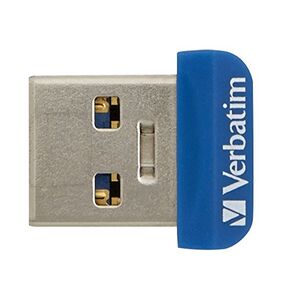 محرك أقراص فلاش Verbatim Store 'n' Stay Nano USB 3.2 Gen 1 سعة 32 جيجابايت، خالي من العوائق، محرك أقراص إبهام منخفض الحجم - أزرق
SAR 60
محرك أقراص فلاش Verbatim Store 'n' Stay Nano USB 3.2 Gen 1 سعة 32 جيجابايت، خالي من العوائق، محرك أقراص إبهام منخفض الحجم - أزرق
SAR 60
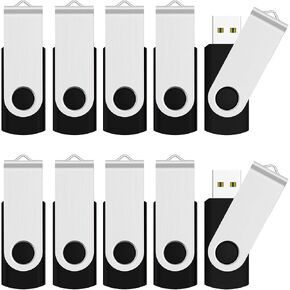 JUANWE محرك أقراص فلاش USB سعة 32 جيجابايت محركات أقراص الإبهام 2.0 Flashdrive | عصا الذاكرة، Fat32 Jump Drive لأجهزة الكمبيوتر المحمول الاحتياطية Zip Drive Memoria Storage Sticks Pendrive، أسود
SAR 50
JUANWE محرك أقراص فلاش USB سعة 32 جيجابايت محركات أقراص الإبهام 2.0 Flashdrive | عصا الذاكرة، Fat32 Jump Drive لأجهزة الكمبيوتر المحمول الاحتياطية Zip Drive Memoria Storage Sticks Pendrive، أسود
SAR 50
 64 جيجابايت - محرك أقراص USB 3.2 قابل للتمهيد لنظام التشغيل Windows 11/10 / 8.1/7، التثبيت/الاسترداد، لا يتطلب TPM، محركات أقراص الشبكة المضمنة (WiFi & LAN)، دعم UEFI والإرث، استعادة البيانات، أداة إصلاح
SAR 110
64 جيجابايت - محرك أقراص USB 3.2 قابل للتمهيد لنظام التشغيل Windows 11/10 / 8.1/7، التثبيت/الاسترداد، لا يتطلب TPM، محركات أقراص الشبكة المضمنة (WiFi & LAN)، دعم UEFI والإرث، استعادة البيانات، أداة إصلاح
SAR 110
 محرك أقراص فلاش الحالة الصلبة 1 تيرابايت، محرك أقراص USB عالي السرعة 570 ميجابايت/ثانية مع محرك أقراص USB من النوع C + USB 3.2، منفذ مزدوج، محرك إبهام متوافق مع iPhone 15، 16،17 Series/Android/Phone/MacBook/Audio/Smart TV
SAR 730
محرك أقراص فلاش الحالة الصلبة 1 تيرابايت، محرك أقراص USB عالي السرعة 570 ميجابايت/ثانية مع محرك أقراص USB من النوع C + USB 3.2، منفذ مزدوج، محرك إبهام متوافق مع iPhone 15، 16،17 Series/Android/Phone/MacBook/Audio/Smart TV
SAR 730




