【Professional Lens Protective Cover】Waterproof, anti-oil, anti-dust and anti-collision, it prevents your action camera lens from scratches and shocks.
【High Light Transmittance】Made of high light transmission and corrosion resistance PC German Bayer 2805, High light transmittance, it does not impact the shooting effect, lightweight and compact design adds minimal burden to your action camera.
【Not For Underwater Shooting 】The lens guards for Insta360 ONE X2 are splash-proof, but are not designed for underwater use. Use the Dive Case for underwater shooting instead.
【Note 1】 Before use, make sure lenses for Insta360 ONE X2 are clean and dry. Upon removing the lens guards for Insta360 ONE X2, apply new adhesives before placing back on your ONE X2.
【Note 2】If the image is distorted or has shadows after installation, please upgrade your phone's Insta360 App and turn on the "Horizontal Correction" and "Eliminate Splicing Chromatic Aberration" functions in the settings.


 PULUZ 52mm UV Lens Filter Adapter Ring for GoPro HERO11 Black / Hero11 Black Mini / HERO10 Black / HERO9 Black Camera Lens Adapter Ring Camera Filter Accessories
SAR 53
PULUZ 52mm UV Lens Filter Adapter Ring for GoPro HERO11 Black / Hero11 Black Mini / HERO10 Black / HERO9 Black Camera Lens Adapter Ring Camera Filter Accessories
SAR 53
 -20%
Puluz Compatible for Insta360 X3 Sticky Lens Guards PC Protective Cover Cap for Insta 360 X3 Waterproof 360 Action Camera Accessories
SAR 67
-20%
Puluz Compatible for Insta360 X3 Sticky Lens Guards PC Protective Cover Cap for Insta 360 X3 Waterproof 360 Action Camera Accessories
SAR 67
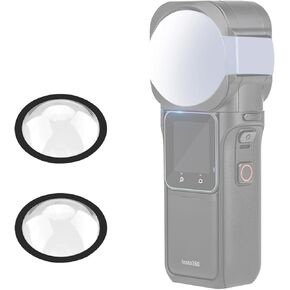 PULUZ Dual Lens Guard PC Protective Case for Insta360 ONE RS 1-Inch 360 Edition Protector Screen Protection Kit
SAR 105
PULUZ Dual Lens Guard PC Protective Case for Insta360 ONE RS 1-Inch 360 Edition Protector Screen Protection Kit
SAR 105
 Puluz Compatible for Insta360 One X2 Sticky Lens Guards PC Protective Cover Cap for Insta 360 One X2 Waterproof 360 Action Camera Accessories
SAR 68
Puluz Compatible for Insta360 One X2 Sticky Lens Guards PC Protective Cover Cap for Insta 360 One X2 Waterproof 360 Action Camera Accessories
SAR 68




