- Shopping, made easy.
- /
- Get the app!
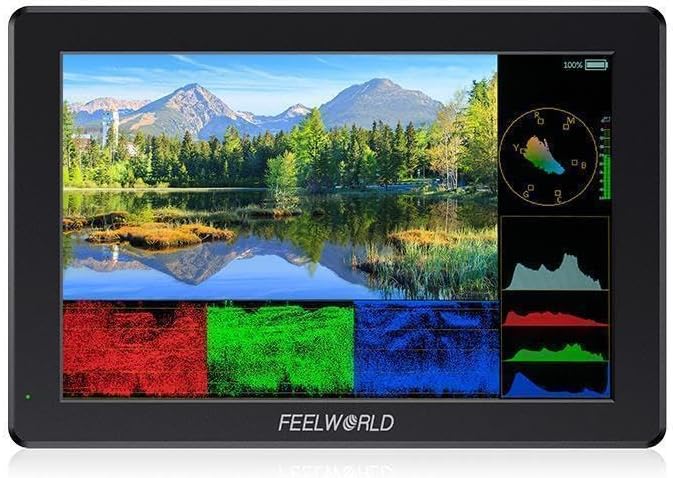
Advanced Features
* Support 3D LUT Log to Rec.709, user 3D LUT Upload (up to 32)
* Waveform (RGB, YUV, Y)
* HDR
* Vector
* Histogram (RGB,Y )
* Embedded Audio
* Focus Assist(Red, Green, Blue three focus colors optional; 1~10 focus level adjustable)
* False Colors (Normal, ARRI)
* Over Exposure (10IRE~100IRE adjustable)
* Check Field (Red, Green, Blue, Mono)
* Scan Mode (Under Scan, Over Scan)
* Anamorphic Mode (1.33x, 1.6x, 2.0x, 2.0x mag, User. Under User, you can custom adjust nx 1.20x~2.00x)
* Image Flip (H Flip, V Flip, H_V Flip )
* Image Freeze
* Center Marker
* Safety Frames (80%, 85%, 90%, 93%, 96%, 2.35:1, 9:16)
* Aspect Ratio (Auto, 16:9, 16:10, 4:3, 5:4, 1.85:1, 2.35:1, Full Screen)
* Ratio Marker(4:3, 13:9, 14:9, 15:9, 16:9, 1.85:1, 2.35:1, 9:16)
* Marker Color (Red, Green, Blue, Black, White, Gray)
* Grid (2x2, 3x3, 4x4, 5x5, 6x6, 7x7, 8x8, 9x9, Custom. When selecting Custom, you can custom the rows and columns from2~9)
* Zoom Mode (2X, 4X, 9X, 16X, User. Under User, you can adjust 100%~200%)
* Pixel to Pixel
* Display Range( Auto, Limit, Full)
* EDID Settings(2.0,1.4)
* User Switch (1~4)
* OSD Time(Off, 15Sec, 30Sec, 45Sec)
* OSD Transparency (Off, 25%, 50%, 75%)
* The background color of screen when no signal (Red, Green, Blue, Black, White, Gray)
* Power Settings (Auto, Manual)
* Color Temp.(5600K, 6500K, 9300K, User. Under User, the red, green, and blue values of the image can be adjusted 0~255)
Model: T7 PRO
Screen Size: 7"IPS
Resolution: 1920X1200 pixels
Pixel Pitch: 0.07875(W) x 0.07875 (H) (mm)
Color Depth: 8bit
Aspect Ratio: 16:10
Brightness: 2000cd/m²
Contrast Ratio: 1200:1
Backlight: LED
Viewing Angle: 80°/80°(L/R) 80°/80°(U/D)
Input
1 X HDMI: HDMI 2.0
1 X USB: Mini USB (LUT file import and Firmware update)
Output
1 X HDMI: HDMI2.0
Audio
Audio: 3.5mm Stereo Headphone
HDMI Input and Output Support Format
720p (60/59.94/50/30/29.97/25/24/23.98)
1080i (60/59.94/50)
1080p (60/59.94/50/30/29.97/25/24/24sF/23.98/ 23.98sF)
4K 3840×2160p (60/50/30/29.97/25/24/23.98)
4K 4096×2160p(60/50/30/29.97/25/24/23.98)
General
Power Connector: DC IN
Input Voltage: DC7~24V
Power Consumption: ≤18W
Working Temperature: -20°C~55°C
Storage Temperature: -30°C~65°C
Install Way: 1/4"-20 Thread Point (bottom)
Unit Size: 182.8x122.8x24 (mm)
Unit Weight: 336g
Note: When you turn off the monitor, you need to press the power button, and you can't pull out the power cable directly.
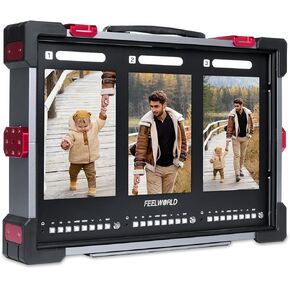 FEELWORLD PS101 Triple 10.1-inch Vertical Display 1000nit Director Broadcast Carry-on Monitor with High Brightness Waveform 3D LUT HDR Portable Protective Case for Short Drama
SAR 6,048
FEELWORLD PS101 Triple 10.1-inch Vertical Display 1000nit Director Broadcast Carry-on Monitor with High Brightness Waveform 3D LUT HDR Portable Protective Case for Short Drama
SAR 6,048
 -7%
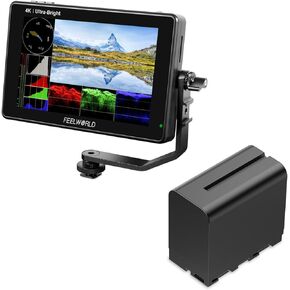
FEELWORLD LUT7 2200nit Camera Monitor and F970 6600mAh Battery
SAR 1,252
-7%
FEELWORLD LUT7 2200nit Camera Monitor and F970 6600mAh Battery
SAR 1,252
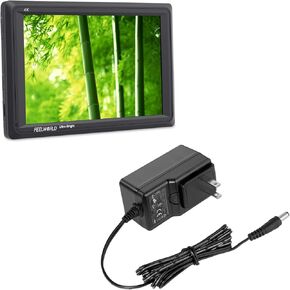 FEELWORLD FW279 Camera Field DSLR Monitor and 12V 3A Power Adapter Bundle
SAR 1,348
FEELWORLD FW279 Camera Field DSLR Monitor and 12V 3A Power Adapter Bundle
SAR 1,348
 -13%
FEELWORLD P6X 5.5 inch 1000nit Aluminium Camera Field DSLR Monitor with Battry and Case Touchscreen 1920X1080 IPS 4K HDMI Input/Output Broadcast Monitor for Film Studio Streaming
SAR 835
-13%
FEELWORLD P6X 5.5 inch 1000nit Aluminium Camera Field DSLR Monitor with Battry and Case Touchscreen 1920X1080 IPS 4K HDMI Input/Output Broadcast Monitor for Film Studio Streaming
SAR 835

