- التسوق ، اصبح سهلا.
- /
- احصل على التطبيق!
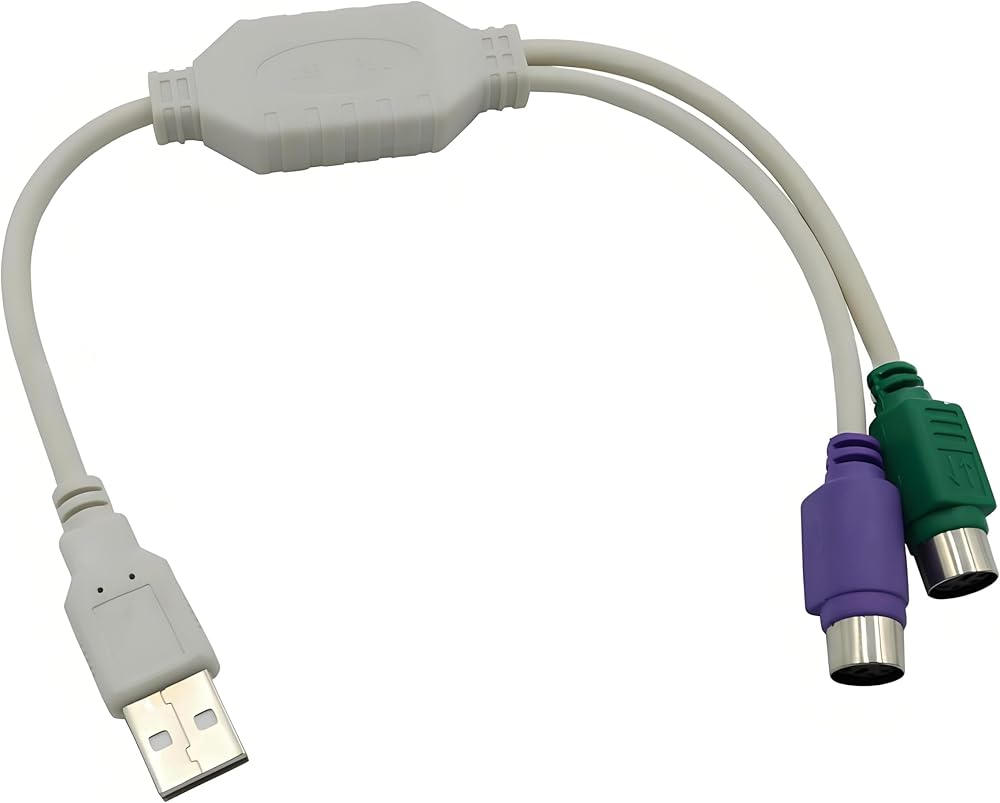
This USB-to-PS2 adapter cable features an integrated design with one end as a USB-A male connector and the other end as dual PS2 female connectors: The input end is a standard USB 2.0 Type-A male connector, compatible with USB 1.1/2.0/3.0 interfaces, allowing direct insertion into USB ports on desktop computers, laptops, and similar devices; The output comprises two 6-pin mini-DIN PS2 female connectors, distinguished by industry standard: the purple port connects to a PS2 keyboard, while the green port connects to a PS2 mouse, supporting three-dimensional three-button scroll wheel mice and multimedia keyboard functions;
Cable length approximately 13 inches (33.8cm), balancing flexibility with desktop tidiness. Compact and portable design requires no additional space.
Product Name: USB to PS2 Conversion Cable
Product Dimensions: 30 x 2.5 x 1.2 cm / 11.8 x 1 x 0.47 in
Connector 1: USB 3.0 Female
Connector 2: Type-C Male
Colour: Black
Important Notes:
1. Device Compatibility
①. Supports only USB-to-PS2 conversion for keyboard/mouse connections to PS2 devices. Does not support reverse conversion (PS2-to-USB) and cannot be used with non-keyboard/mouse PS2 peripherals (e.g., game controllers).
②. Some older industrial PCs or KVM switches may exhibit interface power supply variations. It is advisable to test single devices (keyboard or mouse) first, confirming compatibility before simultaneous use.
2. Operational Guidelines
Select the appropriate cover plate based on chassis type: ①. Switch off the device power before connecting or disconnecting to prevent damage to interfaces or chips caused by live operations.
②. Should the device experience lag or malfunction during use, attempt to reconnect the interface or switch to an alternative USB port on the computer (prioritise rear USB ports for more stable power supply).
3. Functional Limitations
①. This adapter cable does not support hot-swapping (inserting or removing certain devices while powered may cause recognition issues) and cannot replicate the ‘power-on self-test wake-up' function of PS2 devices (e.g., power-on shortcut keys on certain legacy keyboards).
②. For high-end gaming keyboards/mice featuring RGB backlighting and high-speed data transmission, protocol conversion from USB to PS/2 may result in functional limitations (e.g., restricted backlight modes, partial macro key failure).
4. Drivers and Systems
①. Although advertised as ‘plug-and-play', certain niche systems (e.g., specialised Linux distributions) may require manual installation of generic HID drivers. Verify system compatibility beforehand.
②. If both keyboard and mouse fail to respond when connected simultaneously, attempt connecting each device individually. After confirming single-device functionality, reconnect both to diagnose potential power supply or protocol conflicts.
5. Maintenance and Care
①. Avoid excessive bending or pulling of cables to prevent internal copper wire breakage. Regularly clean metal contacts at connectors using a cotton swab dipped in alcohol to remove oxidation and ensure good contact.
②. Do not expose the adapter cable to prolonged high temperatures or humid environments, as this may cause plastic casing deformation or internal chip short-circuiting.
Package Contents: 1 x USB A to PS/2 Adapter Cable (2-in-1, compatible with keyboard and mouse)
 IDE MOLEX 4 PIN ذكر إلى 3 × SATA 15 دبوس كابل توسيع الطاقة الإناث 16.6in 18awg النحاس المعلب - لأجهزة الكمبيوتر/NAS/Server Mechanical Drives/SSDS
SAR 43
IDE MOLEX 4 PIN ذكر إلى 3 × SATA 15 دبوس كابل توسيع الطاقة الإناث 16.6in 18awg النحاس المعلب - لأجهزة الكمبيوتر/NAS/Server Mechanical Drives/SSDS
SAR 43
 16-pin إلى 8x2-pin الفاصل مهائي كابلات سوبر مايكرو خادم الهيكل اللوحة الأمامية ملحق تمديد كابلات محول 22 سنتيمتر/8.8in
SAR 50
16-pin إلى 8x2-pin الفاصل مهائي كابلات سوبر مايكرو خادم الهيكل اللوحة الأمامية ملحق تمديد كابلات محول 22 سنتيمتر/8.8in
SAR 50
 كابل تمديد متزامن ARGB 4P-3PIN 1 أنثى إلى 4 ذكر RGB (21.6 بوصة/55 سم) متوافق مع اللوحات الأم الأكثر شيوعًا ومراوح ARGB ومشعات التبريد السائل
SAR 40
كابل تمديد متزامن ARGB 4P-3PIN 1 أنثى إلى 4 ذكر RGB (21.6 بوصة/55 سم) متوافق مع اللوحات الأم الأكثر شيوعًا ومراوح ARGB ومشعات التبريد السائل
SAR 40
 -20%
(عبوة من قطعتين) كابل محول موليكس 4 سنون إلى 2510 4P-2PIN من 1 إلى 2 مصدر طاقة مروحة الهيكل 12 فولت - كابل تيار عالي 24AWG (5.0 بوصة/13 سم، نظام الألوان الأسود والأحمر)
SAR 36
-20%
(عبوة من قطعتين) كابل محول موليكس 4 سنون إلى 2510 4P-2PIN من 1 إلى 2 مصدر طاقة مروحة الهيكل 12 فولت - كابل تيار عالي 24AWG (5.0 بوصة/13 سم، نظام الألوان الأسود والأحمر)
SAR 36

