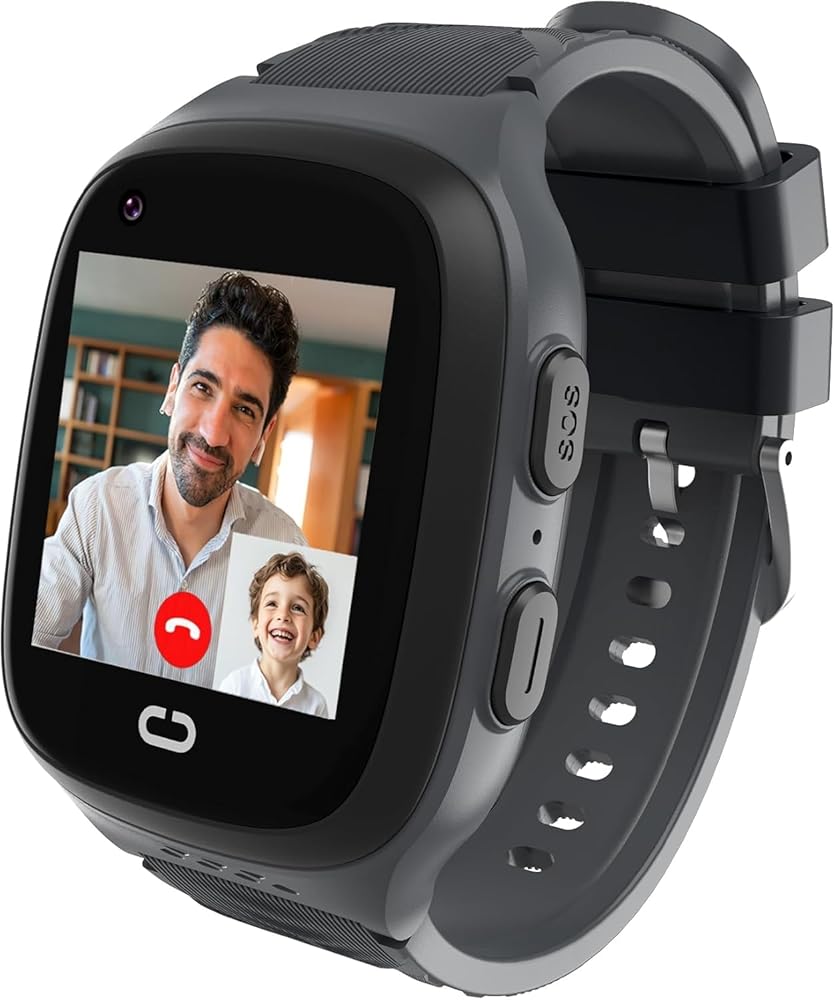
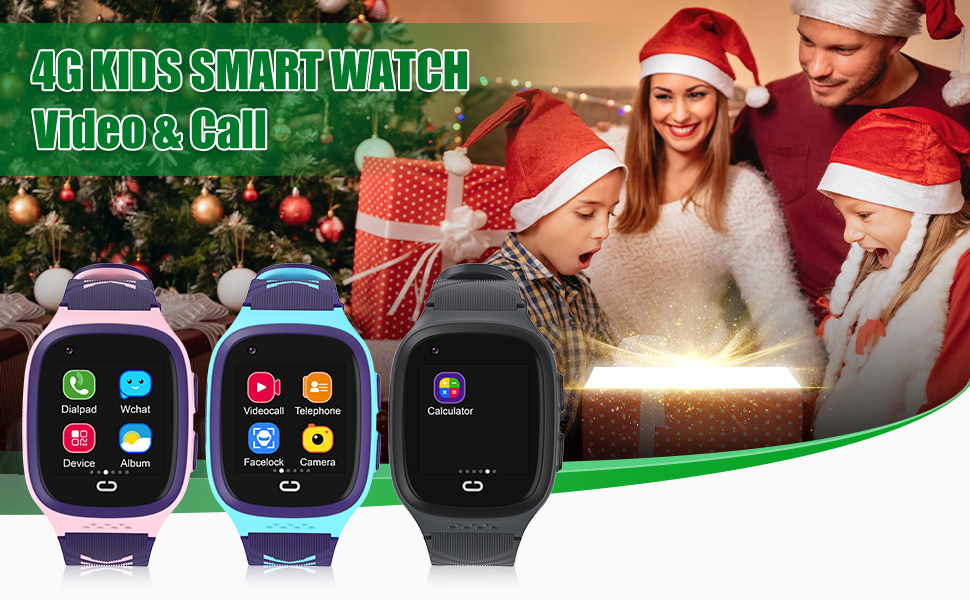
4G Kids Smart Watch Boys with GPS Tracker Location Video Call Cell Phone SOS Calling Voice Chat Camera Alarm Clock Touch Screen SmartWatch Gifts for Age 5-12 Kids (Black)
【Kids Tracking Watch】 Kids Watches equipped with GPS and LBS positioning, enables tracking of your child's real-time location. You can set up customized safety zones and receive alerts on your phone if your child leaves the designated area.
【Kids Watch with SOS Call】The smartwatch for kids has an SOS button, when your child is in trouble and needs your help, they can long press the SOS button for more than 5 seconds and it will automatically dial the emergency contact, so you need to set the guardian's contact information in advance(You can add up to 3 guardians).
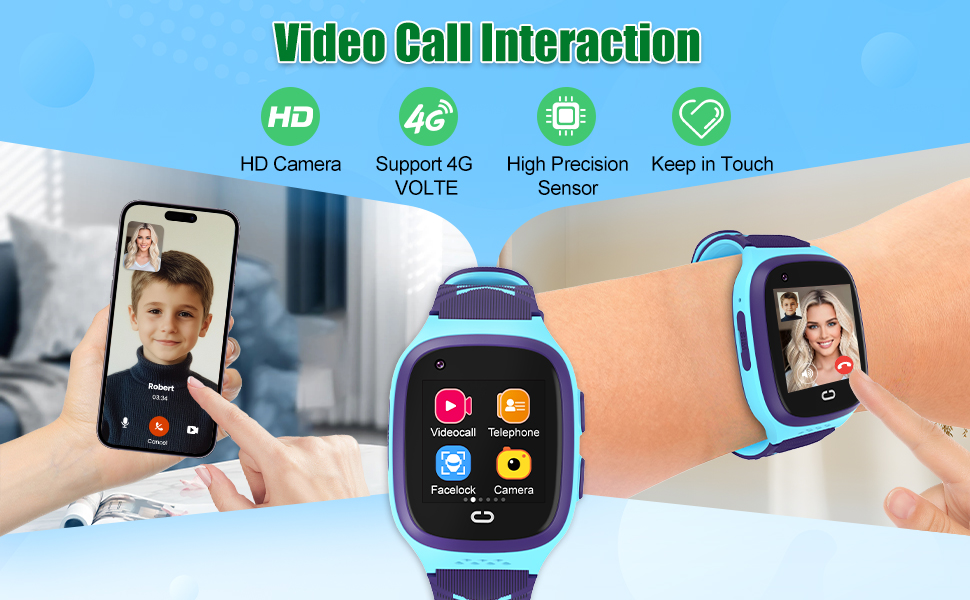
【Multi-functional Kids Smart Watch Boys】 Kids watches comes with SOS call, video call, voice chat, photography, alarm clock, message, pedometer, Phone call, camera, flashlight, stopwatch, calculator, 7 puzzle games, wallpaper.
【Video Call& Voice Chat】 Kids smartwatch with GPS includes voice chat and video call function, you can communicate with your kids at any time and any where, at the same time, you can set the watch for your kids to restrict unknown callers, make the call fast and safe.
【Great Gifts for Kids】 This watch for kids can monitor their movement patterns, step count, and history tracking. This feature helps parents track their child's well-being and encourages healthy habits. The camera that comes with the watch also allows children to record their life and capture the moments they like! And it is a great birthday or Christmas gift for kids aged 5-12.
NOTE: It is need to use Speedtalk Nano SIM card; SIM cards are not included in the package! After inserting the SIM card, You need to restart the watch and make sure there is a 4G mark on the screen after the card inserted.This smart watch for kids needs to be turned on by pressing the power button 5 seconds.
Tip: If there is no network signal displayed above the watch after inserting the SIM card, please find the APN option in the settings and configure it. If you don't know how to configure the APN, please consult us.
 LOKMAT 4G SIM Card Android Smart Watch, 2.16'' AMOLED Large Screen 3GB+32GB Smartwatch for Men Women with Rotating Camera WiFi GPS, 1150mAh Fitness Activity Tracker Watch (Black)
SAR 861
LOKMAT 4G SIM Card Android Smart Watch, 2.16'' AMOLED Large Screen 3GB+32GB Smartwatch for Men Women with Rotating Camera WiFi GPS, 1150mAh Fitness Activity Tracker Watch (Black)
SAR 861
 -40%
Smart Watch for Women Answer/Make Calls, 1.8'' Fitness Tracker Watch Alexa Built-in, Sleep Heart Rate Monitor, 2024 Ladies Smartwatches 120 Sport Modes 110 Dials, for Android iOS Phone, 2 Packs
SAR 389
-40%
Smart Watch for Women Answer/Make Calls, 1.8'' Fitness Tracker Watch Alexa Built-in, Sleep Heart Rate Monitor, 2024 Ladies Smartwatches 120 Sport Modes 110 Dials, for Android iOS Phone, 2 Packs
SAR 389
 -24%
Smart Watch for Men Women Answer/Make Calls, 1.96" HD Fitness Watch with Heart Rate Monitor Sleep Monitor, 113+ Sports Activity Trackers with Step Counter, IP68 Waterproof, Smartwatch for Android/iOS
SAR 100
-24%
Smart Watch for Men Women Answer/Make Calls, 1.96" HD Fitness Watch with Heart Rate Monitor Sleep Monitor, 113+ Sports Activity Trackers with Step Counter, IP68 Waterproof, Smartwatch for Android/iOS
SAR 100
 cjc 4G Smart Watch for Kids with GPS Tracker, Globally Applicable, Texting and Calling, Kids Watch for Ages 4-12 - Includes Video Call, Chat, SOS Alerts, App - Fun & Educational Birthday Gift Idea
SAR 236
cjc 4G Smart Watch for Kids with GPS Tracker, Globally Applicable, Texting and Calling, Kids Watch for Ages 4-12 - Includes Video Call, Chat, SOS Alerts, App - Fun & Educational Birthday Gift Idea
SAR 236

